JavaScope Customization#
This page documents the configuration and customization workflow shared by the current GUI and the legacy GUI.
The current GUI supports additional optional properties.ini keys listed below.
Adjusting the properties.ini file#
Some settings can be configured in properties.ini before GUI startup.
In the GUI, Save Settings writes the current settings to properties.ini and overwrites the previous values.
Common settings used by both GUI generations#
ipAdresssets the target IP address used by the GUI.MEASUREMENTS_PER_TCP_PACKETsets how many measurements are transferred per TCP packet. Keep this value aligned with the GUI and target implementation.scopeChannelNumbersets the number of available scope channels. In the current UltraZohm setup this value is20.smallestTimeStepUSECsets the time step in microseconds with which data is assumed to be transferred to Java. It is used to calculate the time axis of the scope and logger.initScaleCHxsets the initial scaling factor for each of the 20 channels in the scope. Use the delimiter;to separate the scaling values for the channels.initOffsetCHxsets the initial offset for each of the 20 channels in the scope. Use the delimiter;to separate the offset values for the channels.preSelectedChannelNumberssets the pre-selected channel number for each of the 20 channels in the scope. The numbers correspond to theJS_OberservableDataenum injavascope.h. Use the delimiter;to separate the values for the channels.preSelectedChannelVisibilitysets the initial visibility for each of the 20 channels in the scope. Using0disables the visibility of the specific channel, while1turns it on. The visibility can still be changed during runtime by clicking the appropriate channel in the scope legend.ParameterIDselects whether the extension panel is visible. Setting the variable to1enables the panel.
Current GUI optional settings#
autoDetectSamplingRateautomatically detects the effective sampling rate from the incoming packet rate during the first 5 seconds after establishing the connection. If the value is0, the GUI usessmallestTimeStepUSECinstead.triggerChannelselects the trigger source at startup.0selects automatic triggering,1selectsCH1,2selectsCH2, and so on.triggerEdgeselects the trigger edge. The current GUI acceptsrisingorfallingand also the numeric values1and2.triggerValuesets the trigger threshold in plot units.pretriggersets the fraction of the buffer that is shown before the trigger event.sendZeroAckCommandenables the idle0x00acknowledge commands sent by the GUI. Keep this value at1unless the FreeRTOS side of the UltraZohm project was adapted accordingly.ScopeDevTabshows or hides the optionalScopeDevtab with extended functions for development and testing.
Add variables to the scope drop-down menus#
To add a variable to the drop-down menus of the 20 scope channels, follow these two steps:
Open
javascope.h(Vitis:Baremetal\src\include\) and add the name that should appear in the drop-down menu into the enumJS_OberservableDatainsidejavascope.h. Pay attention to the naming convention starting withJSO_.Open
javascope.c(Vitis:Baremetal\src\sw\) and assign a pointer of the variable to be viewed in the scope to the new enum entry from step 1.
The GUI parses the enum JS_OberservableData at startup and your new variable appears in the drop-down menu.
This allows users to add a large number of observable variables to the list, while 20 can be displayed at the same time.
After changing JS_OberservableData, restart the GUI so the updated list is parsed again.
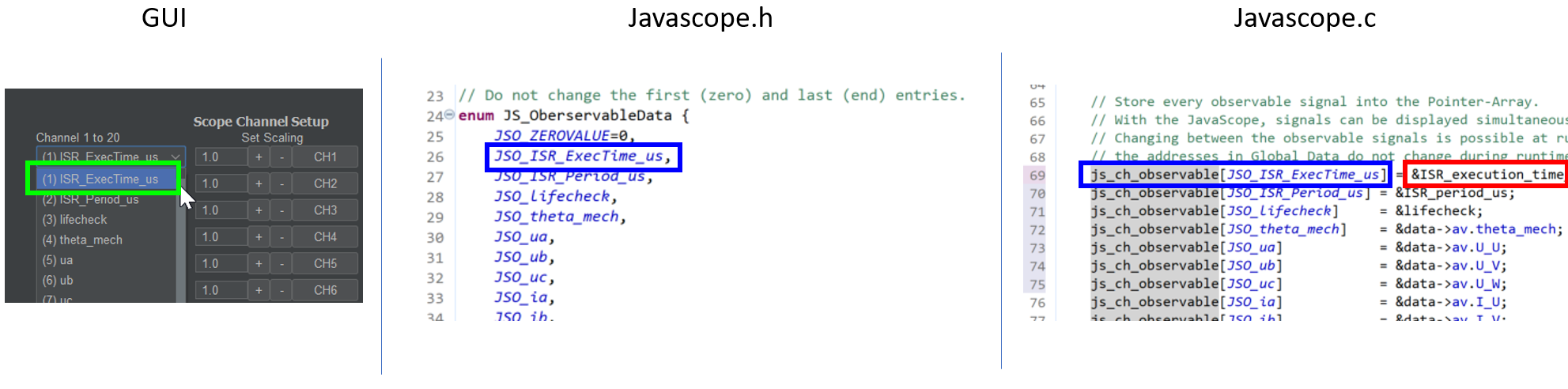
Fig. 73 Correlation of javascope.c, javascope.h and the GUI for adding scope data#
Add variables to SlowData table#
To add a variable to the SlowData table, follow these two steps:
Open
javascope.h(Vitis:Baremetal\src\include\) and add the name that should appear in theSlowDatatable to the enumJS_SlowDatainsidejavascope.h. Pay attention to the naming convention starting withJSSD_INT_orJSSD_FLOAT_.Open
javascope.c(Vitis:Baremetal\src\sw\) and assign a variable to be viewed in theSlowDatatable to the new enum entry from step 1.
The GUI parses the enum JS_SlowData at startup and your new variable appears in the SlowData table.
This allows users to add a large number of SlowData variables to the list.
The longer the table, the slower it updates because SlowData entries are sent one after another with each scope data frame.
After changing JS_SlowData, restart the GUI so the updated table is parsed again.

Fig. 74 Correlation of javascope.c, javascope.h and the GUI for adding SlowData#
Customize the Control tab in the GUI#
For better usability and presentation, you may want to customize the SlowData variables shown in the receive_field_x section, as well as the descriptions and physical units of the send_field_x and receive_field_x entries in the Control tab.
All those can be customized in javascope.h.
Towards the end of this file, there is a commented-out section that begins with /* Visualization Config for GUI */.
The text below is parsed by the GUI at startup and configures text labels and the SlowData shown in the receive_field section.
The eight individual buttons can be labeled in the same way.
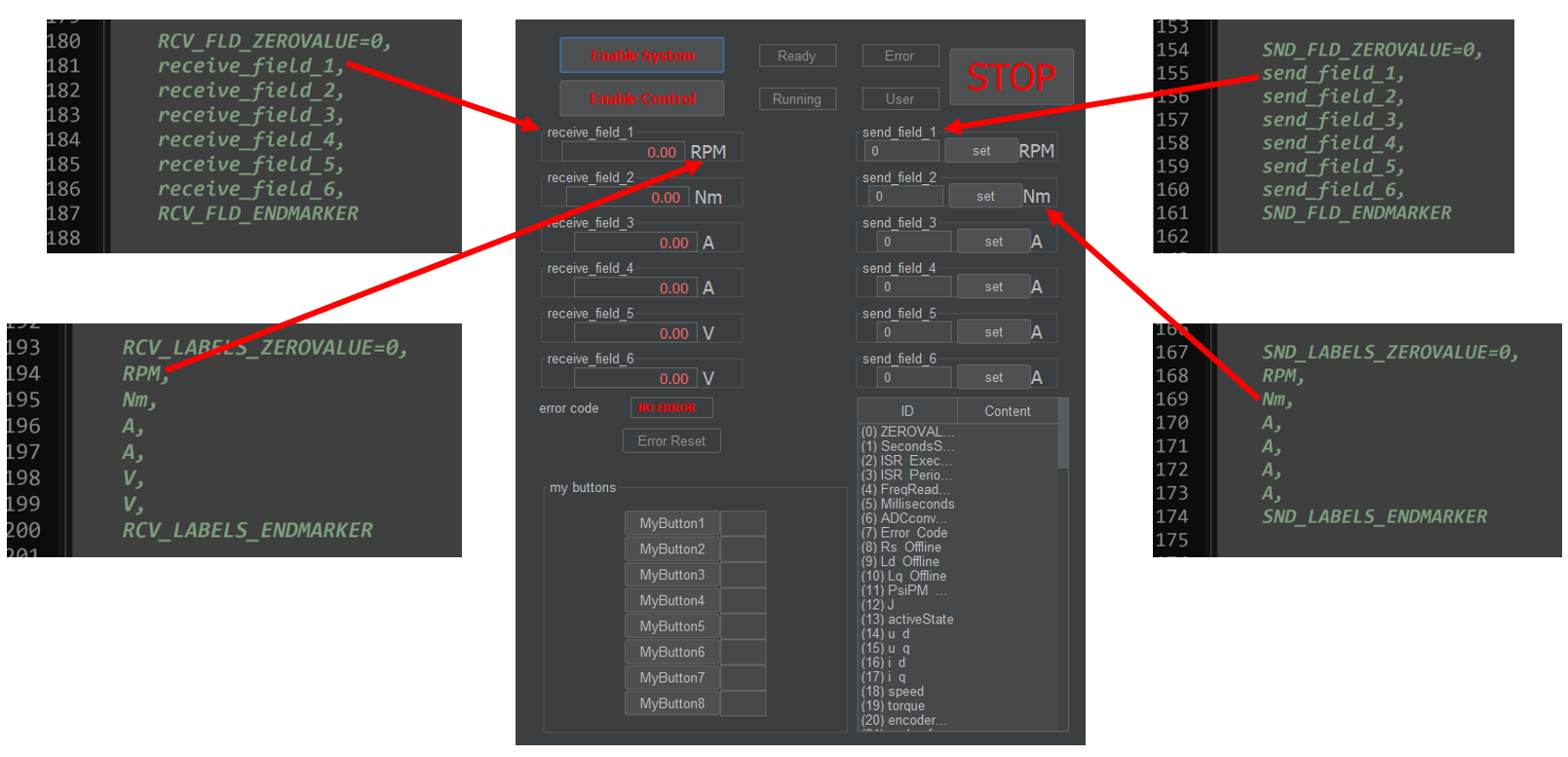
Fig. 75 Correlation of javascope.h and text entries in the GUI#
The selection of which SlowData values are displayed in the receive_field section works in the same way.
Simply copy the proper entries from the JS_SlowData enum into the commented-out enum at the end of javascope.h as shown below.
The SlowData values of the twenty JSSD_FLOAT_x entries above JSSD_FLOAT_Error_Code are displayed in receive fields 1 to 20 from top to bottom.
The JSSD_FLOAT_Error_Code value is always mapped to the error code text field of the GUI and should not be changed.
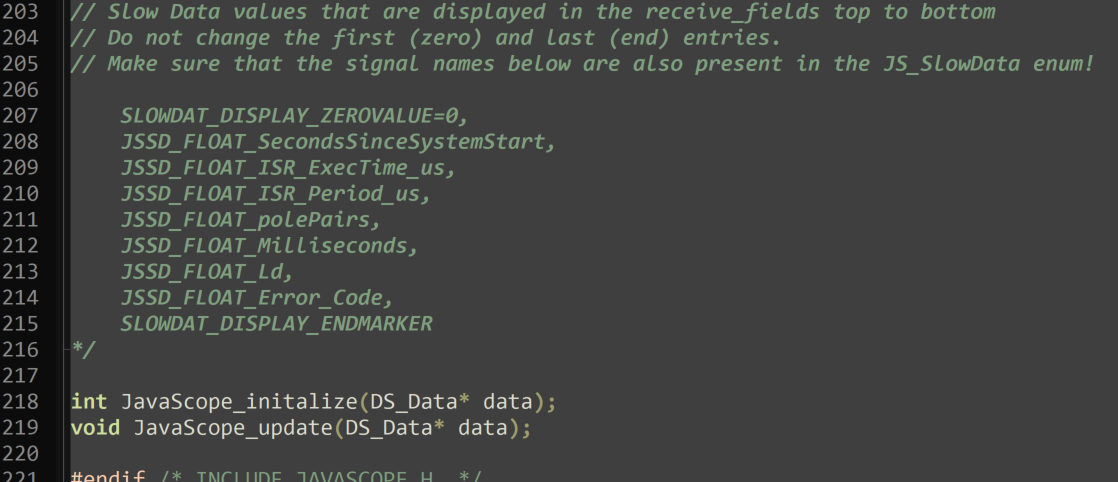
Fig. 76 Correlation of javascope.h and the SlowData displayed in the Control tab#
If not all 20 receive_fields are needed, unused channels can be set to JSSD_FLOAT_ZEROVALUE.
They will appear as value 0 in the receive fields.